
Who Created Grammarly and Where
The AI-powered Grammarly platform was created in 2009 in Ukraine. Its primary goal was to help people communicate correctly in English through correspondence. Now, it can analyze text and provide recommendations for improving grammar accuracy, clarity, and even the tone of the message.
The project was founded by three Ukrainians – Oleksiy Shevchenko, Maksym Lytvyn, and Dmytro Lider. The first editor was launched in 2010, primarily targeting students. Over time, it became clear that the potential audience was much broader, requiring platform functionality expansion. Just three years later, an add-in for Microsoft Office was released, and in 2015, a premium version with four hundred additional advantages compared to the free one.
The company quickly gained momentum, and by 2017, it had 10 million active users. A year later, the service became supported in Google Docs. The platform's functionality expanded year by year. In 2020, 30 million people used the service daily. Today, Grammarly's capabilities and user base continue to grow.
Earlier we wrote: A Full Guide about Fortnite – Login, Skins, App
What Tasks Can Be Solved in Grammarly?
The service has significantly changed since its launch. Initially, it helped correct mistakes, but standard Word checks handled that better. Now, its functionality is so broad that it requires detailed review.
How to Correct Mistakes in Grammarly
This is the first and primary function of Grammarly. It's why users love the service. It works very simply: write, upload, or copy your text into the service window, and the system will automatically check it for grammar, syntax, and other errors. No extra steps are needed. Errors are highlighted in red, and clicking on them shows the correct option.
The program excels in:
- Prepositions;
- Punctuation;
- Spelling;
- Verb, noun, and adjective forms.
We all sometimes struggle with these. Grammarly resolves these issues quickly and efficiently.
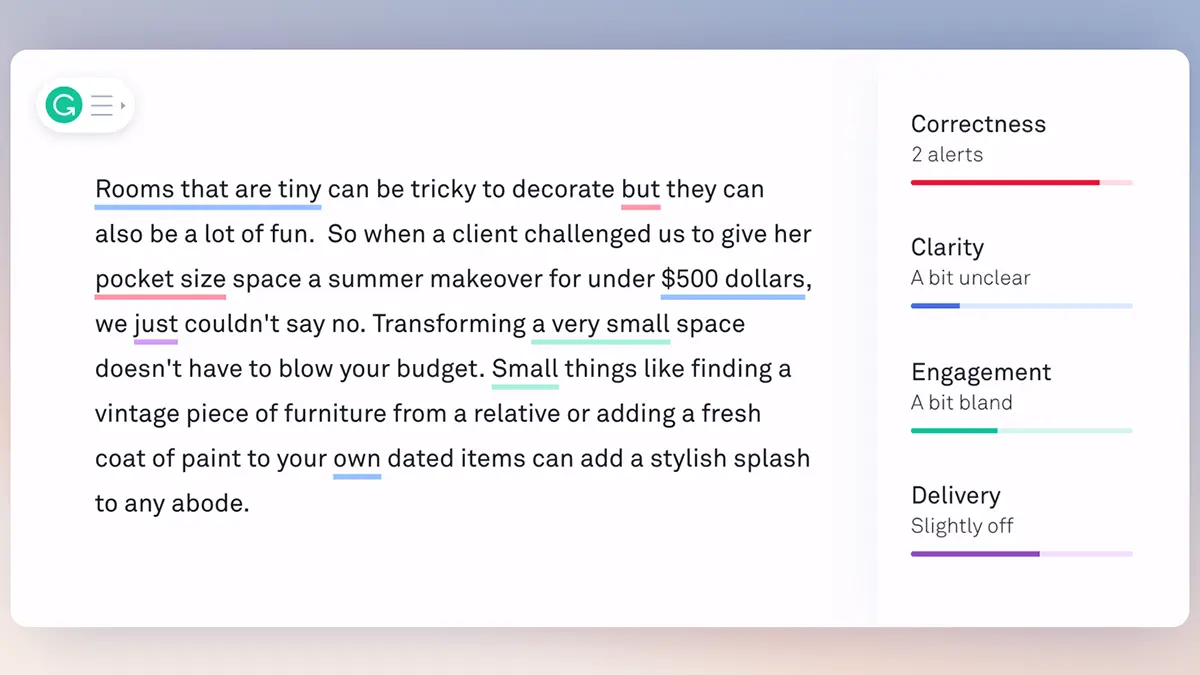
You can also conduct a deeper check, proofreading, or text editing. In addition to grammatical errors, highlighted in red, you can see green, blue, and purple underlines. These are tips on what and how to improve:
- Blue helps simplify the text, making it more accessible;
- Green advises on making the text more engaging;
- Purple suggests how to create the right impression on the reader.
Sometimes it's hard to know the impression your text will make. Surprisingly, AI, specifically Grammarly, can help.
How to Check Uniqueness in Grammarly
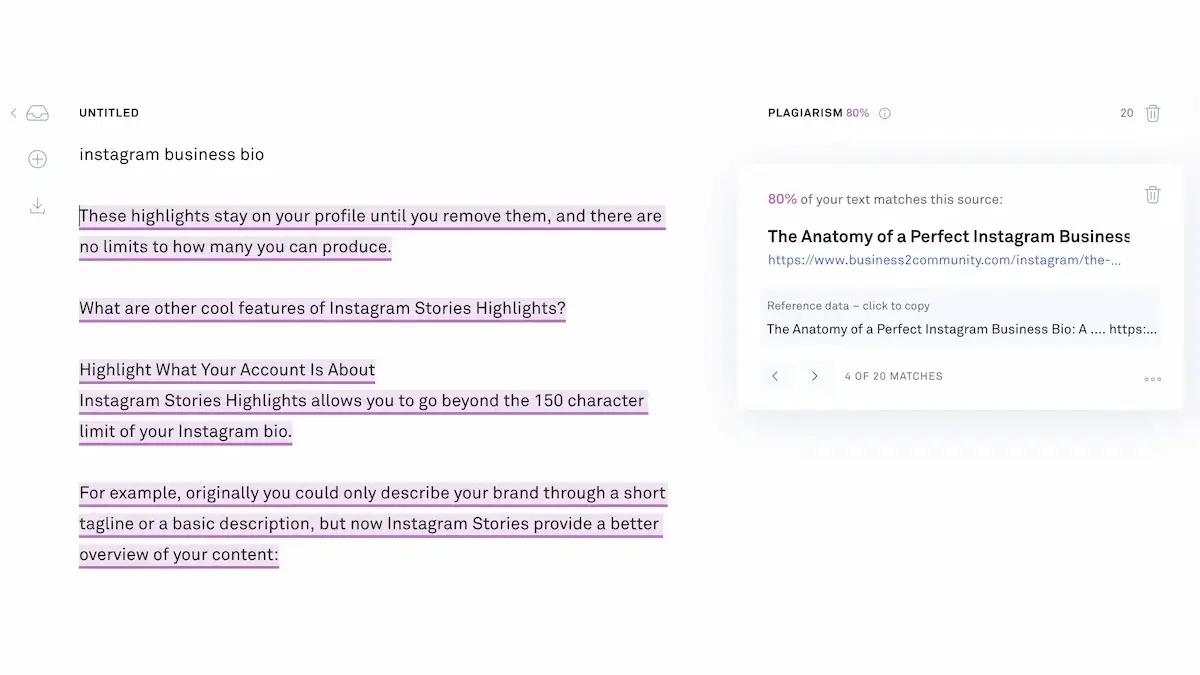
Anyone involved in SERP promotion knows how crucial content uniqueness is. Grammarly didn't want to miss out on many potential users, so they created their plagiarism-checking service. It's very easy to use: just click on "Plagiarism" in the bottom right corner, and the system quickly compares your text with others found online.
The result is displayed as a percentage of plagiarism. This initially seems a bit unusual since other services provide the percentage of unique content.
How to Adjust Style in Grammarly
Grammarly not only checks for grammar mistakes and helps improve the text. The service can also optimize the text based on the set style. The service offers to set goals you want to achieve. You can choose:
- Audience;
- Formality;
- Domain;
- Tone;
- Intent.
AI will help maintain the desired style by providing suggestions and recommendations.
In addition to style recommendations, the platform helps establish a corporate Tone of Voice, essentially selecting a brand's communication style and emotional tone. This feature is available in Grammarly Business. It helps customize text-writing rules within a company, creating a unified approach for emails, social media posts, or commercial proposals.
Reviews on Grammarly
Over the years, the service has earned numerous reviews, mostly positive. Users often highlight the following positive aspects:
- The ability to improve text across various parameters simultaneously;
- A wide range of tools in one service;
- Compatibility with different OS and devices;
- Style customization options;
- Adaptation to different types of English – British, American, Australian, etc.
Few negatives are noted. The only issue might be that some users find it a bit pricey. However, Grammarly isn't one of those services that charge for everything. There's a fully functional free version, but it might miss some mistakes and doesn't grant access to the full functionality.
How to Use Grammarly – Video
To learn how to use all the features of Grammarly, watch this simple beginner's guide:
Conclusions
Grammarly is a great assistant that, unlike a person, won't make mistakes due to fatigue or loss of concentration. The service ensures grammatically and stylistically correct English and is always ready to work. By the way, it's available in various forms– web editor, desktop app, browser extension, mobile keyboard, and more.